Swift Email Processor
Swift Email Processor is an advanced Windows application that allows email marketers perform a number of email processing tasks such as sending messages, processing bounces and feedback loop complaints, removing subscribers from database that have opted out, adding subscribers to database that have opted in or re-confirmed their subscriptions, automating sending messages to new subscribers on your database, validating email addresses via an email verifier API etc.
Swift email processor allows you to automate all your email marketing tasks by combining 4 powerful email processing modules in a single application as follows:
✅ Sending messages ( Sender module)
✅ Bounce and feedback loop complaint processing ( Processor module)
✅ Retrieving messages from POP/IMAP mailboxes for processing ( Receiver module)
✅ Email validation ( Mail Validator module)
The sender module allows users to send CAN-SPAM-compliant messages to their subscribers with the ability to personalize the messages and insert unsubscribe links in every messages sent out. Recipients email addresses can be imported from TXT/CSV files or MYSQL database. The recipients email addresses can also be pooled automatically from a MySQL database at scheduled interval.
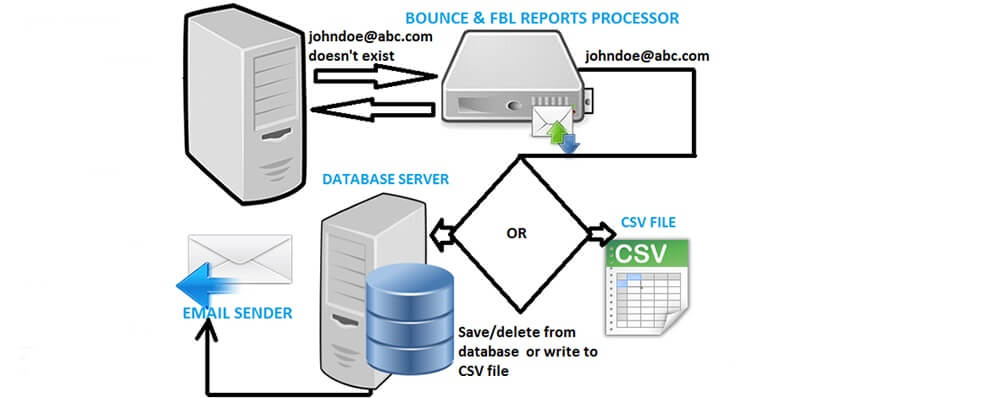
With the processor module in the program, bounced emails in your mailbox can be processed automatically using our powerful bounce processing engine and the bounces can be saved to a CSV file or pushed to your database or update your email database server (delete bounces) in real-time.
Do you have multiple POP3 or IMAP email accounts that you would like to monitor in real-time and extract out all the bounced email addresses? If so, look no further. The real-time bounce email processor module can process your bounces and write to your database or update your email database ( delete bounces) directly on your database, in real-time.
The bounce processing module supports unlimited POP3 and IMAP accounts and bounced email addresses from all message file formats: .dat, .eml, .txt, .msg can be detected with over 98% accuracy using our in-house powerful bounce detection engine that we constantly update daily based on our vast experience with email validation. The POP3/IMAP email bounce processor module classifies all bounces into Hard, Soft and Non-Bounces.
Hard bounces are classified as those emails that are absolutely certain to bounce again if resent. For example,a bounce reason of "User not found" is classified as a Hard bounce. On the other hand, soft bounces are emails that have bounced due to a temporary problem or an unknown issue at the recipeint side. For example, an email with a bounce reason of "Mailbox full" is considered as a "Soft Bounce".
The program is constantly updated with new bounce definitions to keep up with the ever changing variations in different MTA failed Delivery Status Notification message (DSN) formats.
The program is designed to automatically connect to your mailboxes ( unlimited mailbox accounts is supported and can be imported in an easy txt file format)and check for incoming messages, processing the messages to detect bounces and saving the bounced emails in a CSV file or updating your database (deleting the bounced emails)/saving the bounced emails in a database ( as a suppression database). All these operations can be configured to occur automatically in real-time while you sit back and drink your cup of coffee:)
In addition to the bounce processing, the program also includes a powerful automated processing of Feedback Loop (FBL) complaints emails in form of Abuse Reporting Format (ARF) which are sent by ISPs to email marketers or bulk senders that have registered for their Feedback Loop program. The application allows you to specify a custom email header to uniquely identify each of your recipients when you send out your emails. This unique recipient identifier ID is fetched by the application from your list database and automated inserted in each re-confirmation email sent out.
SOFTWARE FEATURES
✅ Includes a mail sender to send personalized and trackable campaigns including Permission Pass campaigns to your subscribers
✅ Supports unlimited SMTP servers. Multiple SMTP servers can be imported using a text file.
✅ SMTP IP connection rate: This feature allows for controlling the number of attempted delivery to recipients within a specified time period per SMTP IP.
✅ Email Throttling: Automatically limit the amount of attempts, connections and number of messages delivered over each SMTP connection
✅ Automatic cold/new SMTP IP warm-up: Program allows you to auto increase the daily sending limits of each SMTP IP by a value specified every X hours without manual intervention
✅ Recipients email addresses can be imported via TXT/CSV file or pooled automatically from a MYSQL database
✅ Email sending occurs in real-time (continous mode) which is very useful for real-time transactional email sending or as auto responder
✅ Ability to subtract bounced emails from the orginal recipients email addresses and export the cleaned emails
✅ Ability to automatically insert personalized info in the messages sent out such as names and unique identifier X-headers for tracking complainers (FBL)
✅ Processed bounces and FBL complainants email addresses can be saved to CSV files or databases. They can also be removed from MySQL database.
✅ Ability to lookup or detect FBL complainers email addresses using unique X-header identifiers stored in CSV or MySQL database
✅ Ability to build a global or specific suppression list from bounced emails, complainers (FBL) and unsubscribes on a central database which can be used to suppress future mailings
✅ Ability to configure 3 databases for simultaneous email address Read, Write and Delete operations
✅ Program is integrated with a powerful email validation API for validating emails as a standalone task or prior to sending campaigns to the email addresses
✅ Ability to compose messages both in plain text and HTML
✅ Application supports subject and message body content spinning using the spintax format: {X|Y|Z...}
✅ Includes powerful metrics such as Deliverability and Complaint Ratio for measuring the success of your campaigns
✅ includes support for unlimited Socks proxies. It is illegal to use this program with the proxy support to evade detection as a SPAMMER. This feature must be used legally.
✅ Powerful bounce detection engine with very high accuracy
✅ The bounce processor module can protect the integrity of your email lists by ensuring they are clean and void of bounces.
✅ Bounce detection engine can detect .dat, .msg, .eml and .txt message formats. The software currently recognizes over 2,000 different bounce formats.
✅ Can detect and extract unlimited bounced emails from offline message files in all formats (.dat, .msg, .eml and .txt) stored on the local system.
✅ Our powerful bounce processing engine can recognize thousands of bounce formats and DNS (Failed Delivery Status Notification) messages with over 98% accuracy
✅ All bounces are classified into Hard, Soft and Non-Bounces with detailed bounced reasons
✅ Processed bounce result are available in CSV file format with an additional option to push the emails directly to your MySQL database or delete the bounced emails from your database
✅ Supports unlimited POP3 and IMAP accounts and parallel multiple processing. You can add hundreds/unlimited number of POP3 or IMAP accounts in a text file using the easy specified format
✅ Support for downloading email messages from IMAP and POP mail servers and saving all the emails in a designated folder on your system
✅ Option to delete bounced messages directly from the email server after downloading
✅ Email sending or bounce processing can be stopped or resumed at any time as desired
✅ Bounce detection engine and definitions are updated regularly and trained to recognize new bounce types with over 98% accuracy with no false positives
✅ Super fast and multithreaded up to 1000 threads
✅ Program runs in real-time continously in order to download and process your messages 24/7 non-stop from unlimited POP3/IMAP accounts
✅ Messages are downloaded directly from the remote POP3/IMAP account(s) into a folder and processed messages are automatically stored in a seperate folder all in real-time
✅ Lifetime license and free upgrades
✅ Free 7 day unlimited trial license